
Give your agent something you can inspect
SolidCraft makes editable CAD parts, Anatomy builds interactive explanations, and DigUp searches inside your files.
12-19 October 2026. Edition 5. Star counts come from LLMRepos daily snapshots; GitHub counts may have changed.
An agent says the job is done. Now comes your job: finding out what it actually made. This week's projects give you something concrete to inspect: an editable part, a working illustration, a research trail or the exact page in a file.
My pick is SolidCraft. Its agent tools and visual editor operate on the same design commands. Ask for a simple bracket, then change a dimension yourself and see whether the part still makes sense. That's a useful test of the handover between an agent and a person.
Moving fastest
tangency-labs/solidcraft
SolidCraft is an open-source parametric CAD app: sketch a shape, constrain its dimensions and build a solid through an editable feature timeline. It gained 5,590 stars (+635.9%) to reach 6,469 in our snapshot window, under its earlier repository identity.
Its MCP server can run a separate design session or connect to the open app so you can watch the work. For a first experiment, ask for a bracket with two mounting holes. Change the hole spacing in the editor, then check the rebuilt shape before exporting it.
The README calls it early but usable for simple parts. Its reference tests are maintainer evidence, not a guarantee that your geometry will work. Keep the first part small enough to check by hand.
wheresryan22/anatomy
A rate limiter is easier to explain when someone can watch the tokens run out. Anatomy is an agent skill for building interactive technical illustrations in SVG, with optional WebGL effects and 3D motion. It added 11,457 stars (+225.9%) to reach 16,529.
Try explaining one mechanism from your product - a queue, a cache or a connection pool - with its actual limits and counts. Ask for a standalone HTML page, then check whether the moving parts and displayed numbers tell the same story. You get source you can edit alongside the illustration.
The documented limits matter: this is a tool for mechanisms and physical objects, and a detailed figure takes a long session. It is not a chart library; 3D mode is beta.
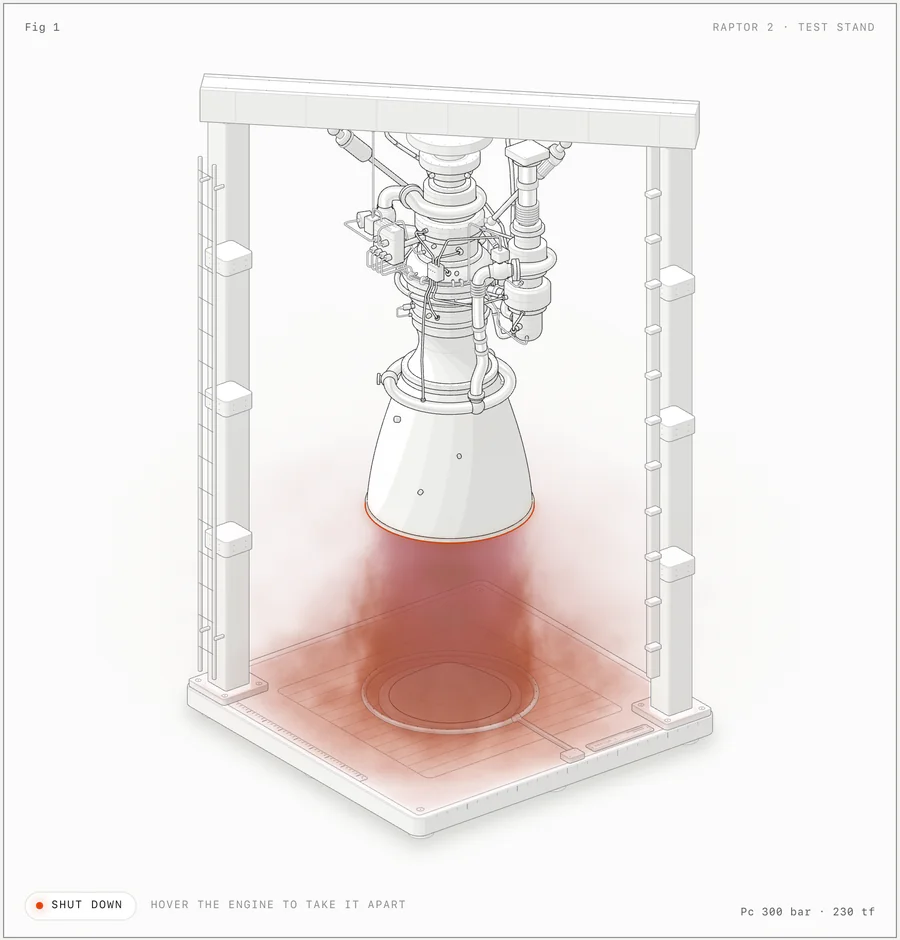
Illustration: Anatomy README, from its committed Raptor engine example.
K-Dense-AI/scientific-agent-skills
Knowing a library's name is the easy bit. Knowing which inputs it expects, which version the example targets and where its results came from is the work. Scientific Agent Skills supplies task-specific instructions and examples for scientific packages, databases and research workflows. It gained 4,294 stars (+8.8%) to reach 52,841, crossing into our largest band.
If you build research tools, start with one workflow you can judge: retrieve papers on a narrow question and check the cited sources yourself. The useful comparison is whether the skill improves the research trail and catches missing evidence.
Read the individual skill requirements before trying it. Some workflows need Python packages, API credentials or registered database access. Installing the collection does not supply those services, and its instructions do not independently validate a scientific conclusion.
New arrival
ARahim3/DigUp
You remember the screenshot. You do not remember what you called it. DigUp searches local files by their contents, including pictures, PDF pages and moments in audio or video. Created 8 October, it reached 4,902 stars by 19 October, up 3,265 over the week.
Give it one folder of old project material and try three searches whose answers you already know. Its README describes on-device indexing and search; code search is a separate opt-in. A match can take you to the relevant page or moment rather than just the file.
Budget for the first pass: the model download is 865 MB, and a large library can take hours to index on a CPU. Windows and Linux builds are beta, and reading exact text inside screenshots is currently Mac-only. Start with a folder, not your entire digital attic.
Quiet but still loved
mlabonne/llm-course
A working demo can hide a shaky understanding of the model underneath it. Maxime Labonne's LLM Course collects learning roadmaps, articles and notebooks covering the fundamentals, model building and application engineering. It had 84,343 stars and 256 days since the last commit in the 19 October snapshot, while gaining 818 stars that week.
Pick one gap that affects your current project. Its notebook list includes introductions to quantisation and decoding strategies: useful starting points for understanding memory costs or why generation settings change an answer. Work through one example and explain the result before moving on.
Treat it as a reading map, with the maintenance gap in mind. Many examples target older models and libraries; check dependencies and hardware requirements before running a notebook. A place on the roadmap does not make an old setup current.
Which agent output takes you longest to check: code, a document, a diagram or something else? If this reached your inbox, reply with one example.
Selection: three risers from distinct end-date star bands (500-9,999; 10,000-49,999; 50,000+), one project created within 90 days and one with at least 5,000 stars and 180 days without a commit. Growth compares paired observations from completed imports on 12 and 19 October; risers need at least 500 stars at both dates. Previous archive features and duplicate identities are excluded. Editorial choices weigh practical value alongside growth. Stars measure attention, not quality. Read this edition online.
LLMRepos tracks open-source LLM and agent repositories using daily GitHub snapshots.
Get the next edition
Five open-source AI repos worth watching, every Tuesday.
Free weekly digest. Double opt-in, unsubscribe anytime.